
Ricoh fi-8170 Desktop Document Scanner
In short: The default departmental scanner — 70 ppm duplex, a 100-sheet feeder, ultrasonic double-feed detection and paper-protection sensing, on USB or the network. The model most Singapore offices scanning a few thousand pages a day actually need.
Above about 3,000 pages a day, move up to a production model such as the fi-8950. If your files contain stapled sets, passports or fragile pages, take an ADF-with-flatbed model such as the fi-8290 instead.
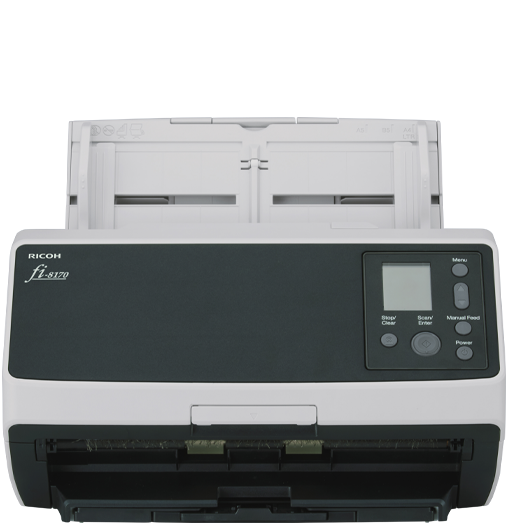
Fast enough to keep up, careful enough to trust
Most departmental scanning is not a project, it is a habit: the morning post, yesterday’s claim forms, a file that has to be in the system before someone can act on it. At 70 ppm duplex a hundred-sheet batch is done in under two minutes, which is the point at which people stop putting scanning off until Friday.
Two sensing systems protect the records. Ultrasonic double-feed detection stops the run when two sheets travel together, so pages are never silently skipped. Paper-protection sensing halts the transport when a sheet starts to crumple, before it tears — the difference between a re-scan and a damaged original.
Prepare
Staples and clips removed; anything bound or torn goes to a flatbed instead.
Load
Up to 100 sheets per load — a normal day’s file batch at a time.
Protect
Double-feed and paper-protection sensing stop the run before a page is skipped or torn.
Output
PaperStream Capture to searchable PDF, PDF/A or TIFF, indexed and routed.
fi-8170 at a glance
Figures from Ricoh published data. Speeds are measured on clean A4 at 200/300 dpi; sustained throughput on aged or mixed stock is lower, and we will tell you what we measured on your own documents.
Where the fi-8170 sits
Pick on sustained daily volume first, then on whether your files contain anything that should not go through rollers.
A desktop scanner is the right buy for day-forward capture. Legacy boxes in the store room are almost always cheaper per page through our bureau than through your staff.
Government buyers procure through GeBIZ, where Micrographics Data is a registered supplier.
How many pages a day can the fi-8170 handle?
It suits departments up to roughly 3,000 pages a day. Ricoh publishes 70 ppm duplex on clean A4; sustained output depends on paper condition and how much preparation each file needs. Above that volume, move to a production model such as the fi-7900 or fi-8950.
What is the difference between the fi-8170 and the fi-8150?
Speed and duty. The fi-8150 runs at 50 ppm for lighter workloads; the fi-8170 at 70 ppm for departments capturing steadily all day. Both share the same feed path design and PaperStream software, so the choice is purely about how much paper passes through.
Does it need a PC?
It works USB-attached to a workstation, and its wired network connection lets it be shared. If nobody sits beside the machine at all, look at the fi-7300NX, which scans to network destinations with NX Manager rather than to an attached PC.
Can it scan books or stapled files?
No. Everything goes through rollers, so bound volumes, stapled sets and torn pages must be prepared or scanned elsewhere. If mixed material is routine, take an ADF-with-flatbed model such as the fi-8250 or fi-8290, or add a standalone fi-70F flatbed beside it.
What is paper-protection sensing?
The scanner monitors sheet behaviour and stops the transport when a page starts to crumple or mis-feed, rather than pulling it through and tearing it. On files you cannot replace, that is worth more than a few extra pages per minute.
How much does the Ricoh fi-8170 cost?
It is quoted per configuration — software, accessories, installation, training and support all change the figure. Micrographics Data issues a written quotation, and a GeBIZ quotation for government agencies and statutory boards.
Do you install and service Ricoh in Singapore?
Yes. Delivery, installation, operator training, consumables and maintenance contracts are all handled by our own Singapore team.
Try it on your own paperwork
We demonstrate the fi-8170 on your documents, set up the output profiles you need, and quote installed.